中断与子图
interrupt 与 Command 的人工介入、多节点中断与子图检查点策略
中断
主要使用 interrupt 和 Command 中的 resume 参数配合,在运行的过程中动态中断和恢复节点的执行,比如需要人工干预的场景。
interrupt 接收可以被序列化的值暴露给调用方,调用方根据这些值决定下一步的操作,然后通过 Command(resume=...) 的方式将处理的结果传递给节点继续执行。
使用约束
- 需要被中断的节点必须拥有同一个
thread_id - 中断的本质是通过
GraphInterrupt异常实现的,不能被捕获异常 - 恢复执行会重新执行整个节点函数,所以节点的操作应该是幂等的,也不要在循环或者判断中增加中断逻辑,避免语义混乱(这一点有点类似 React 中的 Hooks)
from typing import TypedDict
from langchain_core.runnables import RunnableConfig
from langgraph.checkpoint.memory import InMemorySaver
from langgraph.graph import END, START, StateGraph
from langgraph.types import interrupt, Command

class State(TypedDict):
    username: str

def node(state: State):
    ret = interrupt("请输入用户名称")
    return {"username": ret}

config: RunnableConfig = {"configurable": {"thread_id": "111"}}
graph = (
    StateGraph(state_schema=State)
    .add_node("node", node)
    .add_edge(START, "node")
    .add_edge("node", END)
    .compile(checkpointer=InMemorySaver())
)

result = graph.invoke({}, config=config)
# {'__interrupt__': [Interrupt(value='请输入用户名称', id='23bd28fa0b5260b4f5dd53a19c5430dc', response_schema=None)]}
print(result)

username = input(result["__interrupt__"][0].value)
final_result = graph.invoke(Command(resume=username), config=config)
print(final_result)  # {'username': '张三'}
从示例中可以看出,当存在 interrupt 的节点调用 invoke 的时候拿不到真正的结果,而是拿到 __interrupt__ 字典,可以通过 result["__interrupt__"][0].value 拿到其返回的内容。
多节点并行中断
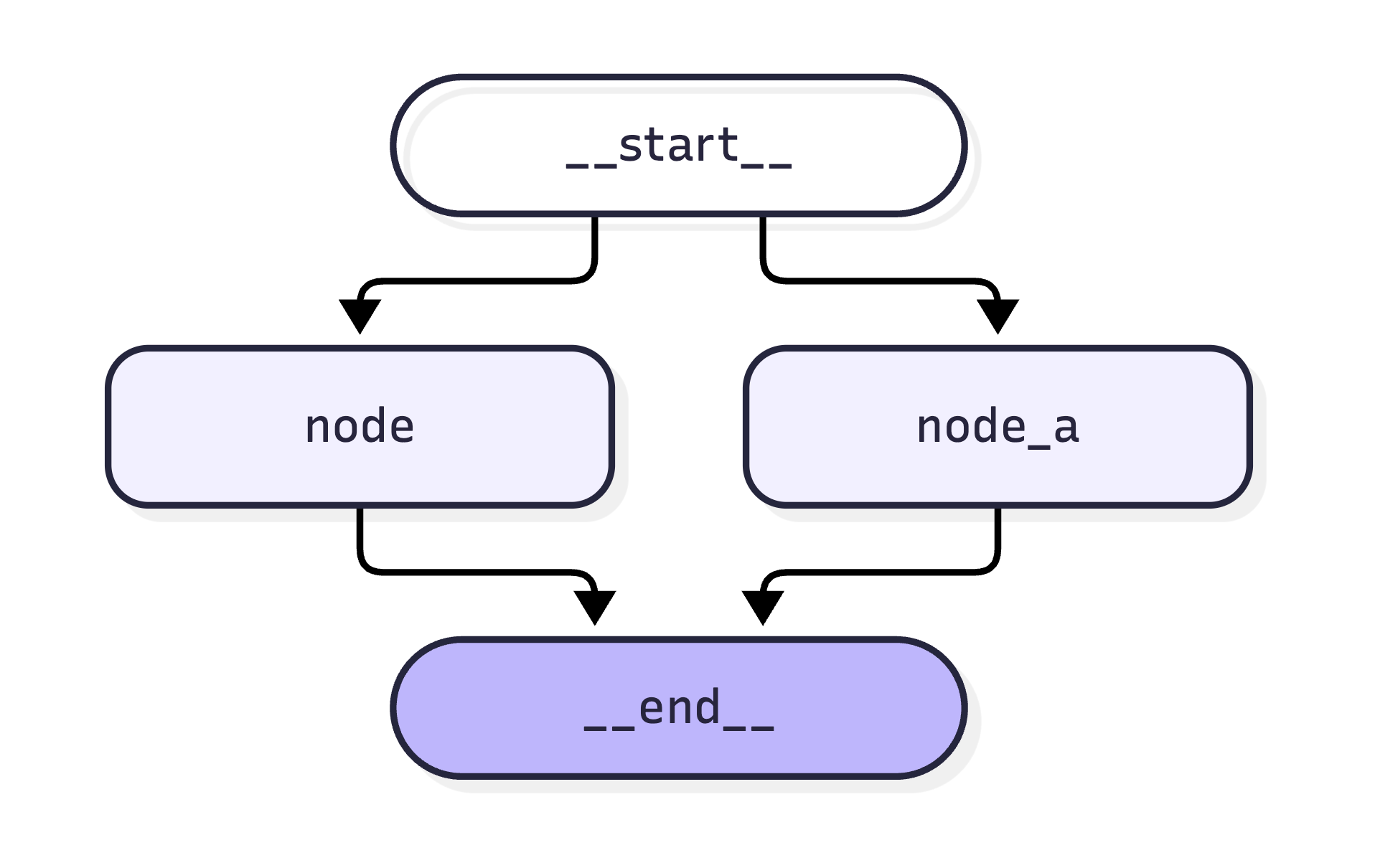
并行中断必须通过 Command(resume=...) 一次性解决掉所有的问题,第一次 invoke 会返回一个 __interrupt__ 的列表。
无论是并行、顺序执行还是其他结构,主要取决于边 edge 如何绘制。
from typing import Any, TypedDict
from langchain_core.runnables import RunnableConfig
from langgraph.checkpoint.memory import InMemorySaver
from langgraph.graph import END, START, StateGraph
from langgraph.types import Command, interrupt

class State(TypedDict):
    username: str
    age: str

def node(state: State):
    ret = interrupt("请输入用户名称")
    return {"username": ret}

def node_a(state: State):
    ret = interrupt("请输入用户年龄")
    return {"age": ret}

config: RunnableConfig = {"configurable": {"thread_id": "111"}}
graph = (
    StateGraph(state_schema=State)
    .add_node("node", node)
    .add_node("node_a", node_a)
    .add_edge(START, "node")
    .add_edge(START, "node_a")
    .add_edge("node", END)
    .add_edge("node_a", END)
    .compile(checkpointer=InMemorySaver())
)

result: dict[str, Any] | Any = graph.invoke({}, config=config)
# {'__interrupt__':
#   [Interrupt(value='请输入用户名称', id='bb9a9997df75f8fec211f67bdb3ad2fa', response_schema=None),
#   Interrupt(value='请输入用户年龄', id='f87db2b5dbe53b7894756ee08f69287a', response_schema=None)]
# }

resume_map = {}
for i in result["__interrupt__"]:
    # 通过每个 Interrupt 对象中的 id 保证数据的准确性
    resume_map[i.id] = input(i.value)

final_result = graph.invoke(Command(resume=resume_map), config=config)
print(final_result)  # {'username': '22', 'age': '11'}
多节点顺序中断
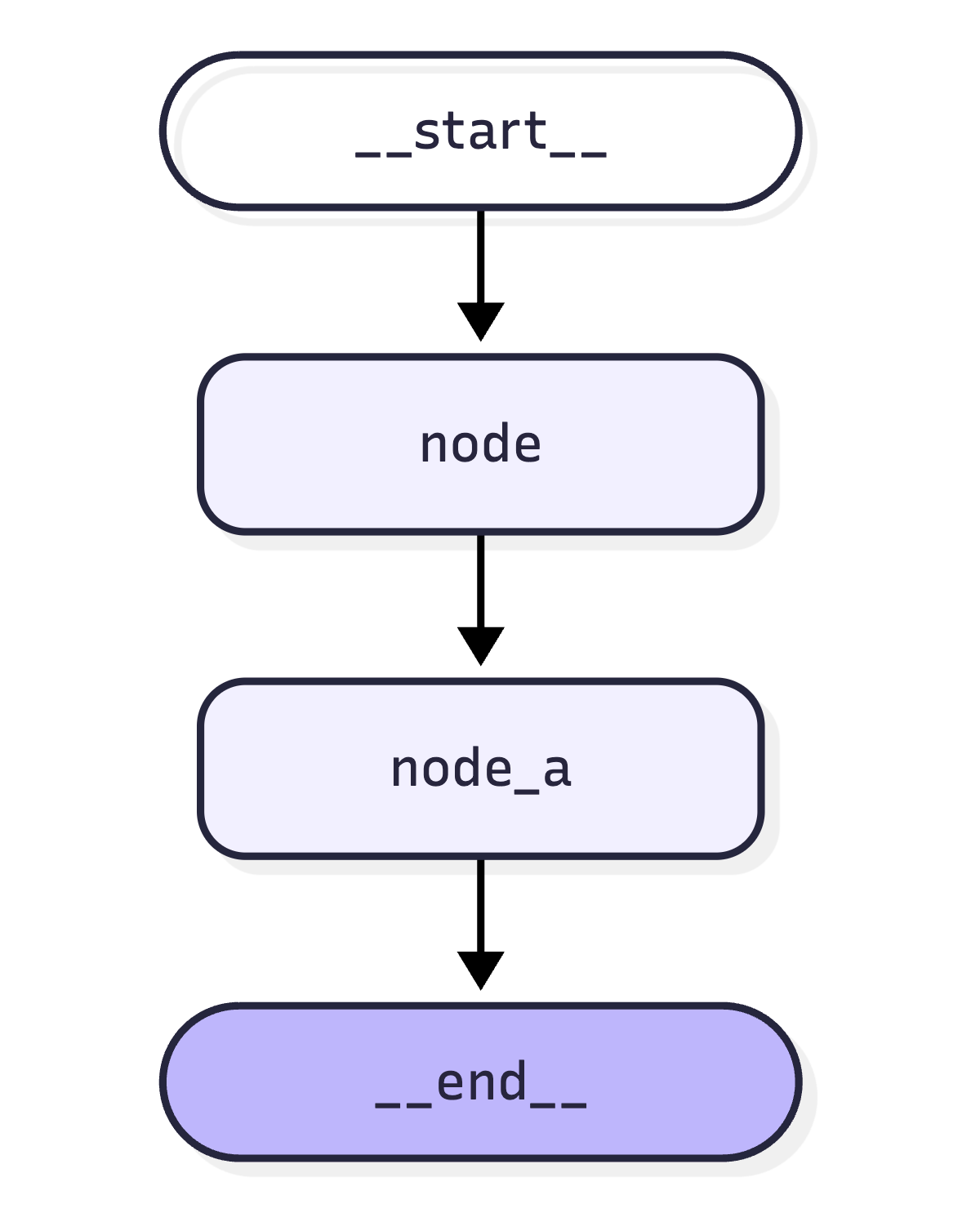
与并行中断同样的代码,但是在 graph 编排环节调整为顺序执行;此时就不需要一次性解决所有的 __interrupt__,因为每次中断只会返回一个,解决后再次调用 invoke 才会看到另一个。
# 编排代码
graph = (
    StateGraph(state_schema=State)
    .add_node("node", node)
    .add_node("node_a", node_a)
    .add_edge(START, "node")
    .add_edge("node", "node_a")
    .add_edge("node_a", END)
    .compile(checkpointer=InMemorySaver())
)
# 运行结果
# 第一次仅返回第一个 Interrupt
# 第二次返回第一个 Interrupt 的结果和第二个 Interrupt
# 第三次则返回所有结果
result: dict[str, Any] | Any = graph.invoke({}, config=config)
# {'__interrupt__': [Interrupt(value='请输入用户名称', id='ebd1fc05bdb46419dcc8237eebbfb310', response_schema=None)]}
print(result)
user_name = input(result["__interrupt__"][0].value)
user_result = graph.invoke(Command(resume=user_name), config=config)
# {'username': 'zhangsan', '__interrupt__': [Interrupt(value='请输入用户年龄', id='62fcbff529045303beb74c1d2fc73557', response_schema=None)]}
print(user_result)
user_age = input(user_result["__interrupt__"][0].value)
final_result = graph.invoke(Command(resume=user_age), config=config)
print(final_result) # {'username': 'zhangsan', 'age': '12'}单节点多次中断
该场景下与多节点顺序中断一致,每次 invoke 仍然只会返回一个 __interrupt__。
def node(state: State):
    user_name = interrupt("请输入用户名称")
    user_age = interrupt("请输入年龄")
    return {"username": user_name, "age": user_age}

config: RunnableConfig = {"configurable": {"thread_id": "111"}}
graph = (
    StateGraph(state_schema=State)
    .add_node("node", node)
    .add_edge(START, "node")
    .add_edge("node", END)
    .compile(checkpointer=InMemorySaver())
)

result = graph.invoke({}, config=config)
graph.invoke(Command(resume="张三"), config=config)
graph.invoke(Command(resume="12"), config=config)
字典类型的 interrupt
给 interrupt 可以传递任意的类型,如果是字典的话则更加灵活,可以是上一个节点的输出,也可以是自己定义的值,直接把结果交给用户去审核或其他操作。
注意动态的值要考虑副作用的问题,中断后会重新执行该节点的所有内容。
def node(state: State):
    user_input = interrupt({"desc": "描述信息", "state": state})
    return {"user": user_input["state"]}

config: RunnableConfig = {"configurable": {"thread_id": "111"}}
graph = (
    StateGraph(state_schema=State)
    .add_node("node", node)
    .add_edge(START, "node")
    .add_edge("node", END)
    .compile(checkpointer=InMemorySaver())
)

result = graph.invoke({}, config=config)
# {'__interrupt__': [Interrupt(value={'desc': '描述信息', 'state': {}}, id='2b6da8e61b02951fd60db6dadeec97aa', response_schema=None)]}
print(result)
在工具中中断
在 tool 里面仍然可以中断工具的调用,经过用户审核后再决定是否继续调用工具,比如在工具内部决定是否调用真实 API。
import os
from langchain.tools import tool
from langchain.chat_models import init_chat_model

# 声明模型
model = init_chat_model(
    model=f"openai:{os.environ.get('DEEPSEEK_MODEL')}",
    base_url=os.environ.get("DEEPSEEK_BASE_URL"),
    api_key=os.environ.get("DEEPSEEK_API_KEY"),
    extra_body={"thinking": {"type": "disabled"}},
)

# 定义工具函数
@tool
def get_weather(city: str):
    """获取某个城市当日的天气"""

    is_accept: bool = interrupt("是否允许查询天气?")
    return f"{city} 今天天气晴朗" if is_accept else "拒绝查询"

# 为模型绑定工具
model_with_tools = model.bind_tools([get_weather])
from langchain.messages import HumanMessage, ToolMessage
from langchain_core.runnables import RunnableConfig
from langgraph.checkpoint.memory import InMemorySaver
from langgraph.graph import END, MessagesState, START, StateGraph
from langgraph.types import Command, interrupt
def llm_node(state: MessagesState):
result = model_with_tools.invoke(state["messages"])
return {"messages": [result]}
def tool_node(state: MessagesState):
last_message = state["messages"][-1]
# 模型并不会主动调用工具,只是会经过评测有哪些工具可以使用
# 所以需要手动调用一次工具且构造出工具消息进行返回
tool_messages = []
for tool_call in last_message.tool_calls:
if tool_call["name"] == "get_weather":
# 通过工具名进行调用
res = get_weather.invoke(tool_call["args"])
# 构造工具消息
tool_messages.append(
ToolMessage(
content=res, tool_call_id=tool_call["id"], name=tool_call["name"]
)
)
return {"messages": tool_messages}
def router_node(state: MessagesState):
if state["messages"][-1].tool_calls:
return "tool_node"
return END
config: RunnableConfig = {"configurable": {"thread_id": "111"}}
graph = (
StateGraph(state_schema=MessagesState)
.add_node("llm_node", llm_node)
.add_node("tool_node", tool_node)
.add_edge(START, "llm_node")
# 构造 llm 到 tool 或者 end 的条件边
.add_conditional_edges("llm_node", router_node, path_map=["tool_node", END])
# tool 到 llm 的回环,因为工具调用完的消息还要交给模型去分析
.add_edge("tool_node", "llm_node")
.compile(checkpointer=InMemorySaver())
)
result = graph.invoke({"messages": HumanMessage("上海今天的天气如何?")}, config=config)
print(graph.get_graph().draw_mermaid())
is_accept = input(result["__interrupt__"][0].value)
final_result = graph.invoke(Command(resume=is_accept), config=config)
print(final_result)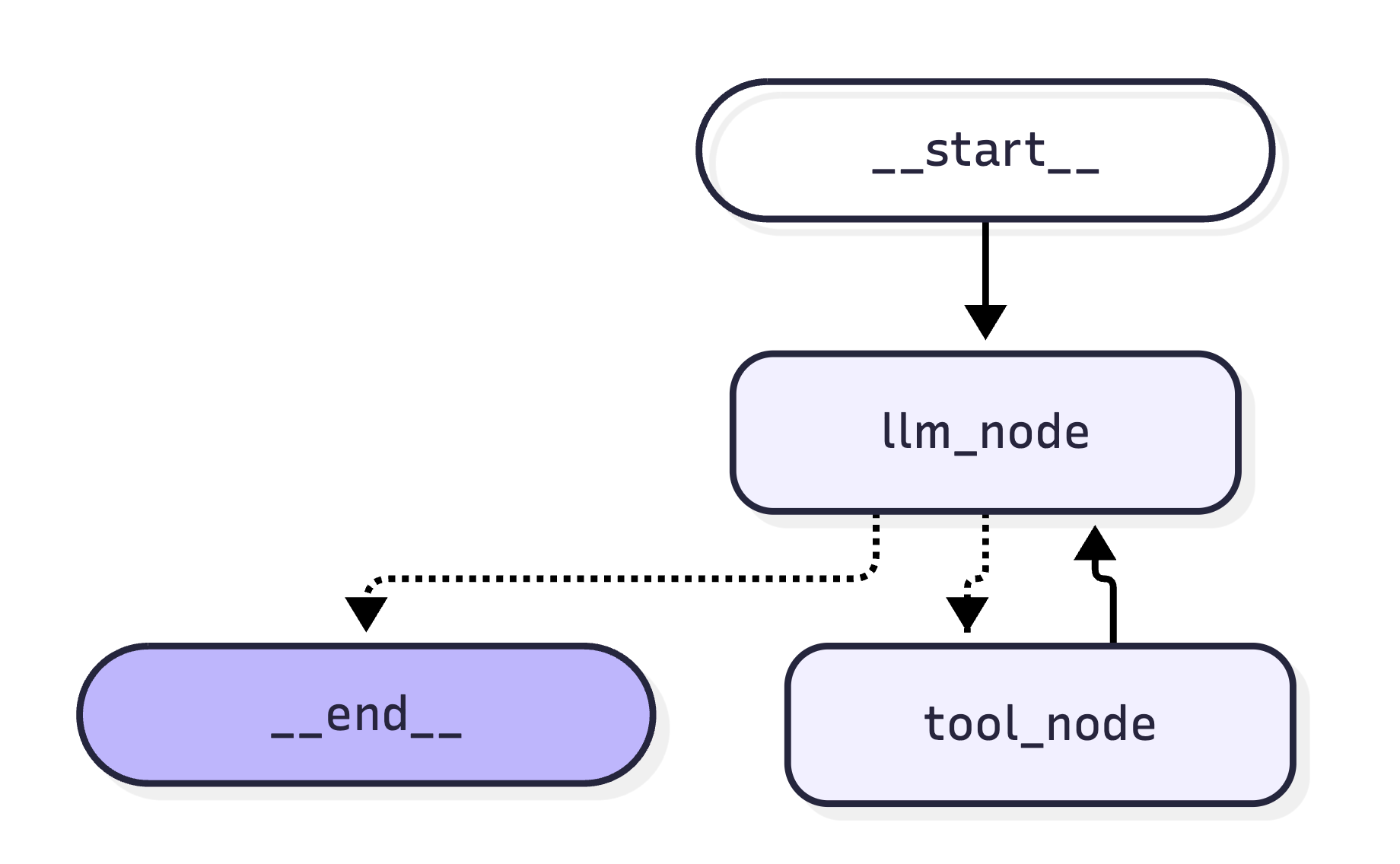
子图
被当做另一个图的节点,或者在图中调用的图都被称为子图,比如构建多智能体、分布式(每个智能体处理不同的任务)等场景。
- 在节点内调用子图:图与图之间的状态不共享
- 当做另一个图的节点:图与图之间的状态共享
在节点内调用子图
# ================== 节点内调用子图 ==================
class SubState(TypedDict):
    username: str

def node_1(state: SubState):
    return {"username": state["username"]}

sub = (
    StateGraph(state_schema=SubState)
    .add_node("node_1", node_1)
    .add_edge(START, "node_1")
    .compile()
)

class State(TypedDict):
    username: str
    age: int

def node_2(state: State):
    # 在父图的某个节点中,直接调用子图
    # 如果想要把子图的结果暴露出去,还是要依赖父图提供 State
    result = sub.invoke({"username": "张三"})
    return {"age": state["age"], "username": result["username"]}

main = (
    StateGraph(state_schema=State)
    .add_node("node_2", node_2)
    .add_edge(START, "node_2")
    .compile()
)

# {'username': '张三', 'age': 20}
result = main.invoke({"age": 20})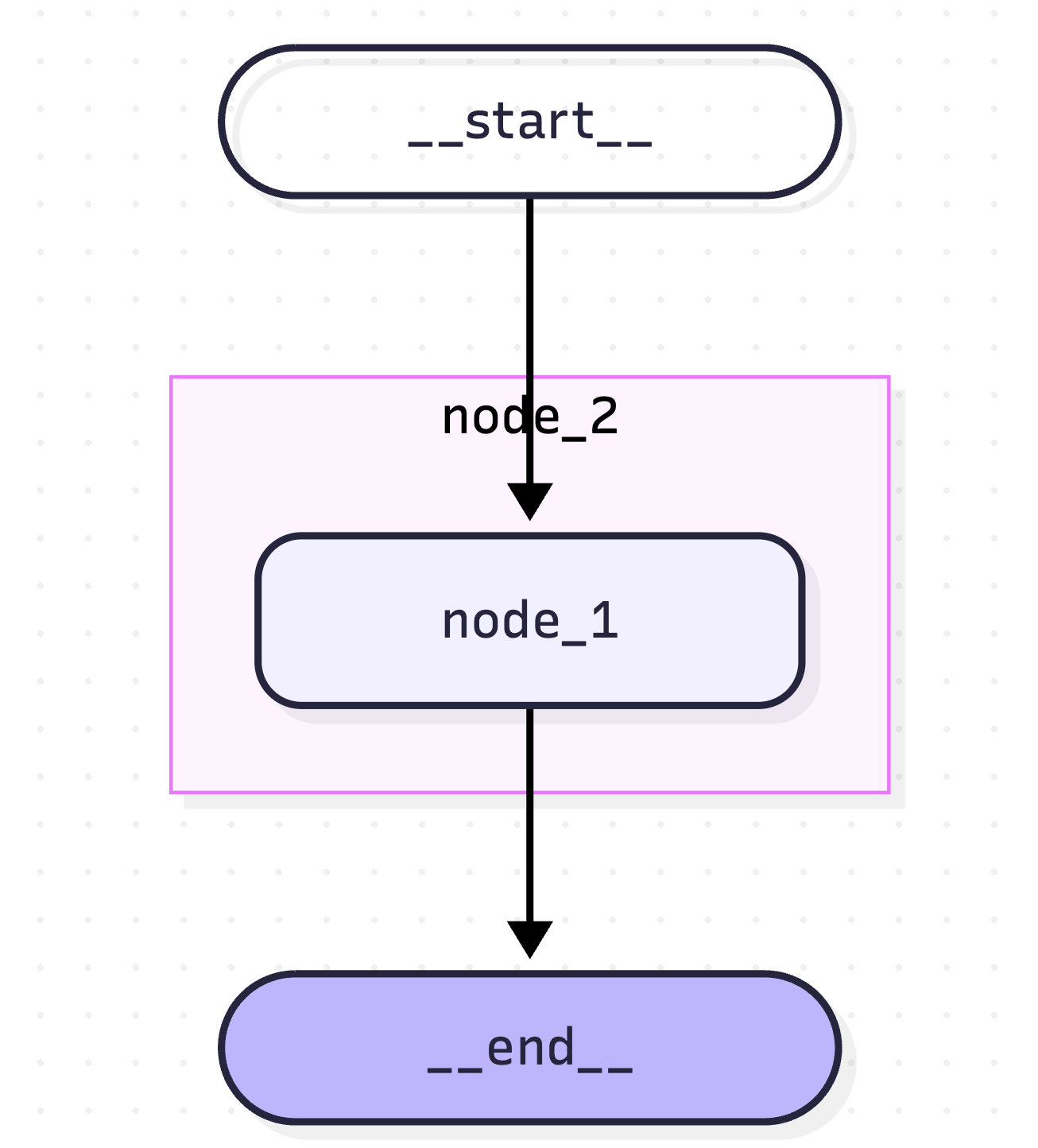
作为父图的节点
# ================== 当做另一个图的节点调用 ==================
class State(TypedDict):  # 共用一个状态
    username: str
    age: int

def node_1(state: State):
    return {"username": state["username"]}

sub = (
    StateGraph(state_schema=State)
    .add_node("node_1", node_1)
    .add_edge(START, "node_1")
    .compile()
)

def node_2(state: State):
    return {"age": state["age"]}

main = (
    StateGraph(state_schema=State)
    .add_node("sub", sub)  # 将子图当做节点
    .add_node("node_2", node_2)
    .add_edge(START, "sub")
    .add_edge("sub", "node_2")
    .compile()
)

# {'username': '张三', 'age': 20}
# 调用时直接传递所有的默认值
result = main.invoke({"username": "张三", "age": 10})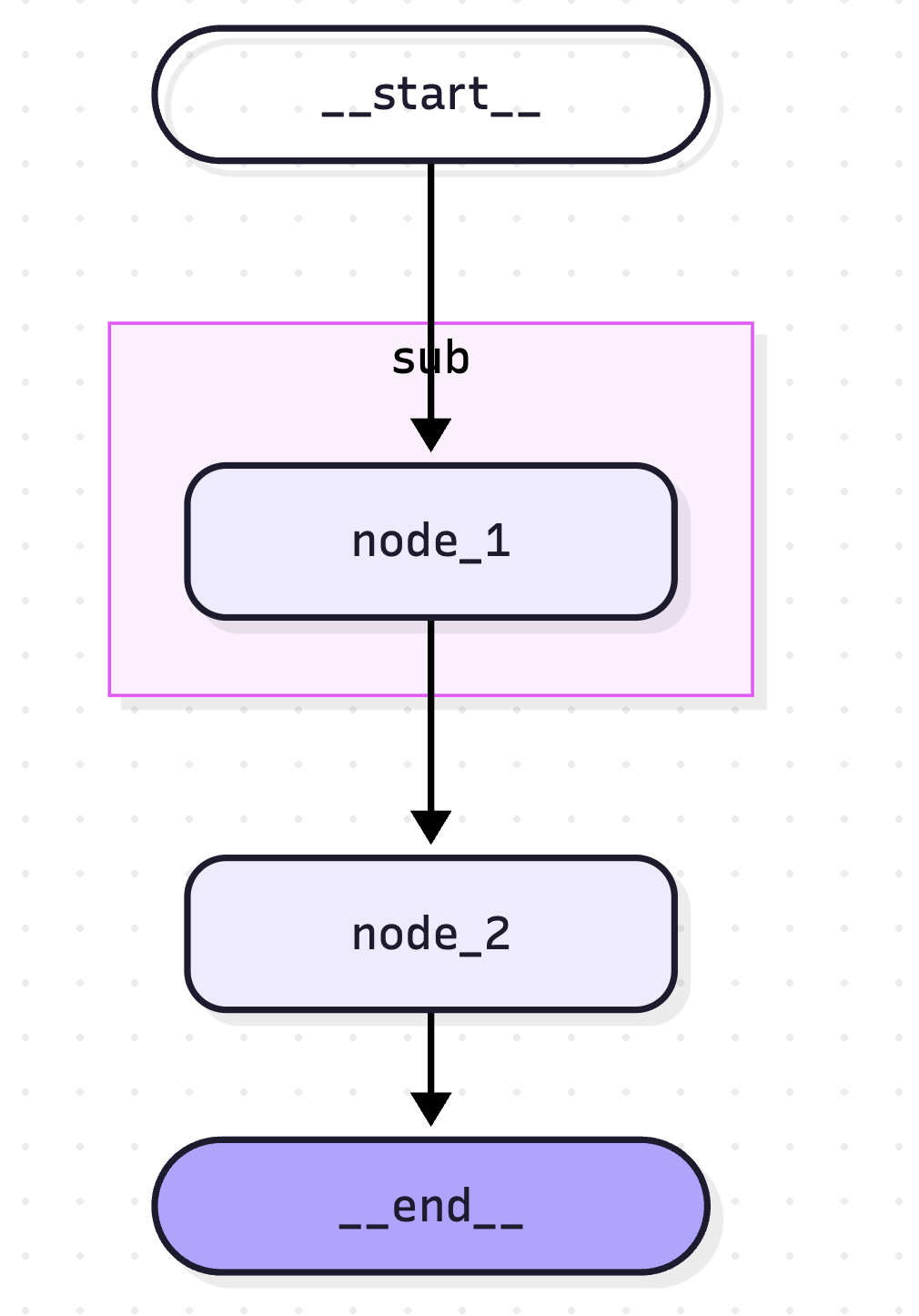
如果想要打印带有子图的 mermaid 需要额外添加参数 main.get_graph(xray=True).draw_mermaid()。
数据持久化
前提是父图中已经使用了检查点,在子图中有三种策略,也是通过 checkpointer 指定。
- 默认值
None:每次调用都会重新开始,会继承父图的检查点,本身没有记忆,可以中断恢复 True:同thread_id会加载历史False:没有检查点模式,不支持中断
from langchain.agents import create_agent
from langchain.messages import HumanMessage
from langchain_core.runnables import RunnableConfig
from langgraph.checkpoint.memory import InMemorySaver
from langgraph.graph import END, MessagesState, START, StateGraph
from langgraph.types import Command, interrupt

# ================== 默认值 None ==================
agent = create_agent(
    model,
    system_prompt="快问快答助手,善于用干净利索的话语回答用户。",
    checkpointer=None,  # 这个底层也是 langgraph 因此它也是子图
)

class State(MessagesState):
    question: str

def node(state: State) -> State:
    # 每次调用都会中断
    approve = interrupt("是否回答用户的问题")
    if not approve:
        return {"messages": []}

    result = agent.invoke({"messages": [HumanMessage(state["question"])]})
    return {"messages": result["messages"]}

subgraph_builder = (
    StateGraph(state_schema=State)
    .add_node("node", node)
    .add_edge(START, "node")
    .compile(checkpointer=None)  # 不传递 或 None
)

config: RunnableConfig = {"configurable": {"thread_id": "111"}}
graph_builder = (
    StateGraph(state_schema=State)
    .add_node("sub_graph", subgraph_builder)
    .add_edge(START, "sub_graph")  # 子图当做节点执行
    .compile(checkpointer=InMemorySaver())
)

# 第一次打招呼,触发中断,然后 AI 回答问题
result_1 = graph_builder.invoke({"question": "你好,我是海绵宝宝"}, config=config)
is_approve = input(result_1["__interrupt__"][0].value)
result_2 = graph_builder.invoke(Command(resume=is_approve), config=config)
print(result_2["messages"][-1].content)

# 第二次询问,触发中断,然后 AI 回答问题
result_1 = graph_builder.invoke({"question": "知道我是谁吗"}, config=config)
is_approve = input(result_1["__interrupt__"][0].value)
result_2 = graph_builder.invoke(Command(resume=is_approve), config=config)
print(result_2["messages"][-1].content)

# 是否回答用户的问题y
# 你好,海绵宝宝!今天有什么问题需要我快速解答吗?
# 是否回答用户的问题y
# 不知道。你是?
与默认值同样的示例,仅将 checkpointer=None 的地方调整为 True。
# ================== True ==================
agent = create_agent(
    model,
    system_prompt="快问快答助手,善于用干净利索的话语回答用户。",
    checkpointer=True,
)

subgraph_builder = (
    StateGraph(state_schema=State)
    .add_node("node", node)
    .add_edge(START, "node")
    .compile(checkpointer=True)
)
如果调整为 False 后,则不涉及检查点的开销,后续如果出现异常,也无法进行修复。